Memory Lane: Windows 95, 30 years on
Around this very day* but 30 years ago, I found myself downloading and installing the latest Window 95 stable builds directly from the development team servers at Microsoft’s headquarters in Redmond.
Somehow I became involved in the Windows 95 launch, which included a retailers-only product preview dubbed Training Tour, held at various gatherings across Spain.
What an invaluable experience it was: multi-disciplinary, international meetings bringing together marketing teams, product managers, technical support specialists, and more. Above all, it was thrilling to be one of the very few who had an early hands-on experience with the next big breakthrough from one of the world’s leading software powerhouses.
As an information technology vendor hired for the occasion, I was tasked with performing a live presentation showcasing the outstanding advancements brought by the new operating system.
The challenge: highlighting the breakthroughs
From a purely practical perspective, perhaps that was the first major improvement: Windows, once the production application running atop MS-DOS, was now the operating system itself. What had once been the prompt vanished from our daily workflows—No need to type C:\>win any more.
One of my duties was preparing the presentation script, which included bringing up multiple tiled windows on a big screen for the audience to witness, each window performing different tasks simultaneously, like rendering dynamic Bezier curves, seamlessly playing “Buddy Holly” by Weezers or “Good times” by Edie Brickell video clips, while managing files, folders and drives within the far more intuitive Windows Explorer, the replacement for Program Manager from earlier versions, and dragging those windows around the screen, no flickering or pauses, just magical: Multitasking had arrived.
Next in the game-changers line-up was Plug & Play—PnP for short. Prior to Windows 95, setting up peripherals like monitors, printers, and sound cards was often a daunting task. Users had to manually install the correct drivers, configure IRQ settings, and go through endless testing, hoping to avoid conflicts with other hardware. After all these years, it’s hard to fully recall the complexity of it all, but the fact was that PnP changed everything, making device setup dramatically simpler and far more user-friendly.
Multimedia also got its fair share in the spotlight. The revamped graphical interface not only brought a visual overhaul but also transformed how games handled graphics and physics thanks to DirectX. While it wasn’t immediately recognized for revolutionizing gaming, some early titles left a mark, like Pinball, which became an instant hit, although not exactly for its thrilling gameplay, if you know what I mean.
Another watershed moment in PC evolution was native sound support, meaning no more third-party add-on installations. Remarkably, all these breakthroughs ran on the same existing computers that had been running MS-DOS 6.22 just the day before. It didn’t require a massive leap in computational power—it was like turning an econo-box commuter into a muscle car overnight.
Speaking of command lines, Windows 95 put an end to the restrictive 8.3 filename format. Gone were the days of 8-character names followed by a rigid 3-character extension. Up to 255 characters long, users could now name files anyway they pleased, even using extensions beyond three characters long. For regular users, this was a true liberation—arguably, one of the most impactful improvements for workplace productivity.
Of course, with this transition came the tilde (~) symbol in the command-line filenames. Many international users had to figure out how to type it on their keyboard like via Alt+126 keystroke combination. If this doesn’t ring a bell, chances are you never had to deal with command-line file management in Windows 95.
Standardizing compatibility: a boost for hardware and software
The Designed for Windows 95 program, marked by its distinctive logo, was a turning point for hardware vendors and software manufacturers, piggybacking on Windows 95 huge success and, at the same time, fostering it. Certification meant better compatibility, smoother integration, and an industry-wide shift toward Windows as the standard platform–What a bliss for IT maintenance teams and procurement managers alike!
Although quiet, it is worth mentioning yet another revolution—Windows 95 introduced native support for CD-ROMs, signaling the beginning of the end for the iconic but unpractical 3½-inch floppy disk. The physical side of data storage had forever evolved for the good. By the way, while the majority of PC users today never laid hands on a floppy disk, its legacy lives on in the universally recognized “Save” icon.
Microsoft Office 95
Alongside Windows 95 came Microsoft Office 95, the first truly integrated suite. Previously, Office was merely a bundle of independent production applications packaged together, but this new version introduced shared features and standardized toolbars. The now ubiquitous red curly underline signaling grammatical errors was first seen then.
Shortly after the retailers’ Training Tour events, Windows 95 was officially launched to the general public, and it was nothing short of spectacular.
Let the show begin
Rolling Stones’ Start Me Up became forever linked with the Start button, while some stores opened at one second past midnight on launch day: enthusiasts camped overnight, eager to get their hands on a copy. It was a phenomenon never seen before—or since—when it came to an operating system launch.
While marketing fueled the excitement, planning for what was about to come was just as crucial, although it all happened behind the scenes. With countless new users entering the Windows platform, technical support had to be restructured.
Enter Product Service and Support (PSS), the team ensuring a smooth transition. While the final line of service remained in-house, most lower-level support operations were outsourced, requiring a heavy-duty user database system. The locally handcrafted Delta database was thus migrated to the company-wide Microsoft Manager 3.0.1. I was thrilled and honored to be involved in both processes: training the new support staff and implementing the new database system.
Incidentally, such migration process was my first localization project although, back then, I didn’t know it by that name.
Little I could I have imagined that three years later I’d be rubbing shoulders in Microsoft’s Dublin facilities with the very same guys that had made Windows 95 localized builds available for me to download and install. Those were the days Espresso gave way to LocStudio, the trailblazers for many software localization tools.
But that’s an entirely different story.
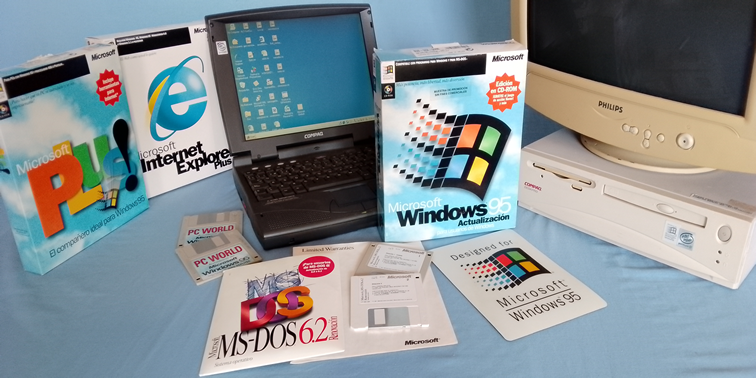
* Simultaneously published on ramonortega.com and LinkedIn on 16 June 2025